Macro Commander Basic2.0.0.0
Publisher Description
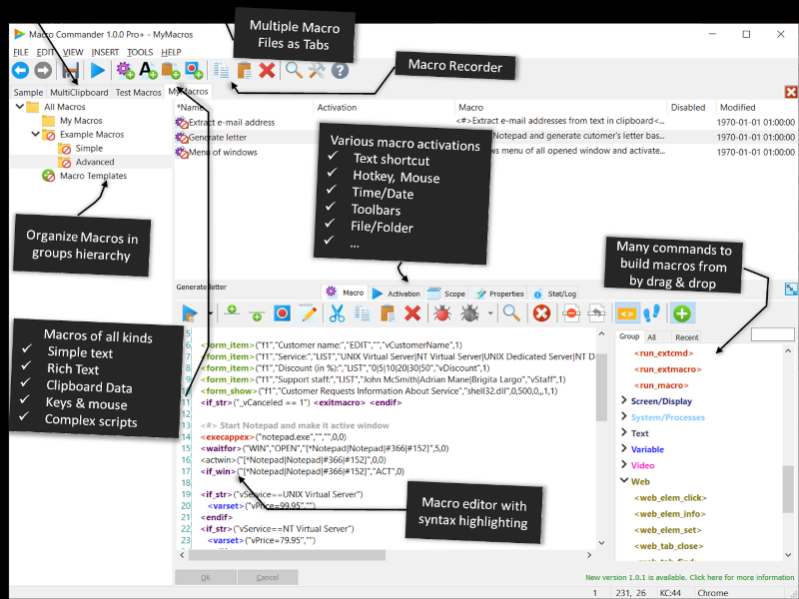
Introducing Macro Commander Basic - a versatile and free automation software for Windows, catering to all your macro recording, text expansion, mouse clicking, automated data entry, and general automation needs. Whether it's native applications or web-based ones, this tool has got you covered. You can effortlessly activate macros using hotkeys, text shortcuts, or mouse commands, and even schedule them to run automatically without any supervision. Moreover, the program enables you to input various data types, including pictures, tables, formatted text, and anything found in your clipboard.
With its user-friendly interface, organizing macros into groups becomes a breeze, and configuring them becomes more convenient through inheritance. Crafting macros is a seamless process with a feature-rich macro editor supporting syntax highlighting. Alternatively, you can record macros directly using the built-in macro recorder. Simplify your tasks with Macro Commander Basic!
About Macro Commander Basic
This Office Suites & Tools program is available in English, Bengali, ChineseSimplified, ChineseTraditional, French, German, Hindi, Italian, Japanese, Korean, Portuguese, Spanish, Turkish. It was last updated on 29 September, 2026. Macro Commander Basic is compatible with the following operating systems: Windows.
The company that develops Macro Commander Basic is Softutils. The latest version released by its developer is 2.0.0.0.
The download we have available for Macro Commander Basic has a file size of 38.8 MB. Just click the green Download button above to start the downloading process. The program is listed on our website since 2024-03-27 and was downloaded 51 times. We have already checked if the download link is safe, however for your own protection we recommend that you scan the downloaded software with your antivirus. Your antivirus may detect the Macro Commander Basic as malware if the download link is broken.
How to install Macro Commander Basic on your Windows device:
- Click on the Download button on our website. This will start the download from the website of the developer.
- Once the Macro Commander Basic is downloaded click on it to start the setup process (assuming you are on a desktop computer).
- When the installation is finished you should be able to see and run the program.
Program Details
General
System requirements
Download information
Pricing
Version History
version 2.0.0.0
posted on 2024-03-27
Optimizations for Windows 11; Many UI improvements for high resolution displays; Added "Duplicate" button to duplicate selected macro; Fixed searching for macros; Added support for additional languages
version 1.1.0.0
posted on 2023-12-10
Macro recorder improved; UI improvements; Macro time scheduler fixes; Performance improvements; Macro pause/stop enhanced; Alt+Shift+Esc key combination was added to immediately stop all running macros; Stability improvements; Other smaller fixes and improvements
version 1.0.1
posted on 2023-07-02
This version fixes a problem with Shift+Alt+Right Arrow key combination and an issue with displaying and attaching macro toolbars.
